It made sense coming from SGML where you're mostly reading and writing text with an occasional bit of markup. Now it seems some people don't even know that text can appear on a page without first being munged in using the DOM.
Allow me to plug my project here to resurrect SGML in all its glory.
Just two days ago, my paper for parsing HTML5.1 in its entirety using SGML [1] has been accepted for the XML Prague conference, if anyone is interested.
A few years ago I managed to resurrect my first website which I wrote back in 1994/5 (found it on the waybackmachine.) When I re-published the site I left the uppercase HTML in place as historical artifacts sprinkled throughout the code. :)
hah, I just was taking a look at that old code again and found this little gem:
   <H3 ALIGN = CENTER><BLINK>Frame ALERT!</BLINK><H3>
   <P>
   This document is designed to be viewed using <B>Netscape 2.0</B>'s
   Frame features.  If you are seeing this message, you are using
   a frame <I>challenged</I> browser.
   </P>
PS: I agree with Graham on his last point about web design, but that was the first example of fixed resolution that came to mind. I still write 2 or 3 css rules each time I read one of his essays.
Actually, this was not his last point. The last point was commented out (if you read the page's source, you'll find this after the 70 characters per line comment).
<!-- <b>How did you make the buttons in your site?</b><br><br>It's made with Yahoo Store. Yahoo Store made all the images in this site, not just the buttons but the titles and thumbnails as well. Within the software there is an image renderer, written in C, that takes as input s-expressions describing images.<br><br><b>What are the email addresses in white text at the bottom of the pages?</b><br><br>Bait for spam crawlers. -->
Here's my opinion:
The fixed resolution has fixed dimensions, not a fixed ratio. Meaning if you view the content on a different screen setting, the content will not change to preserve readability. It's different than the 70 characters per line because you still have 70 characters per line on a bigger screen. The eye not having to travel horizontally is the point because the travel can be irritating at any character size.. That's why code is limited to 70-80 characters per line.
However, this is a problem on mobile: on a big screen, the 70 character is a good thing because you still have a good chunk of text vertically and are able to read with ease. On mobile, on the other hand, your reading speed is way faster than 80characters * number of lines displayed on a mobile screen.. So you spend your time scrolling frantically to keep up with how fast your eyes are reading.
On a laptop, HN is too small but even having it zoomed at 150%, I still have a lot of leeway to read fast. On mobile, the layout is a bit better but every thread seems to go on like forever because the amount of scrolling is just insane.
70 characters per line was because horizontal eye scanning has a higher cost than vertical scanning. But a muscular action of the hand has a higher cost than both, which you're paying on mobile. Imagine reading a book in which each page has only 5 lines and you have to turn the page every couple of seconds. It's just way too tiring.
From Tim Berners-Lee -
"Some tags take parameters, called attributes. The attributes are given after the tag, separated by spaces. Certain attributes have an effect simply by their presence, others are followed by an equals sign and a value. (See the Anchor tag, for example). The names of tags and attributes are not case sensitive: they may be in lower, upper, or mixed case with exactly the same meaning. (In this document they are generally represented in upper case.)"
I don't think it was ever case sensitive. I'm pretty sure that in 1994, I was using lower case html tags without issue at university in Mosaic. Netscape Navigator definitely allowed you to use lower case tags. My final year project was littered with mixed case tags.
I wouldn't think you really need an <html> tag, provided the server has specified the right Content-Type.
Heck, given that you can set stylesheets using the Link HTTP response header rather than the <link> tag, you can skip the separation of <head> and <body> for simple pages as well. Just start with what would go inside the body, and then the <head> ends up where it belongs—in the headers. ;)
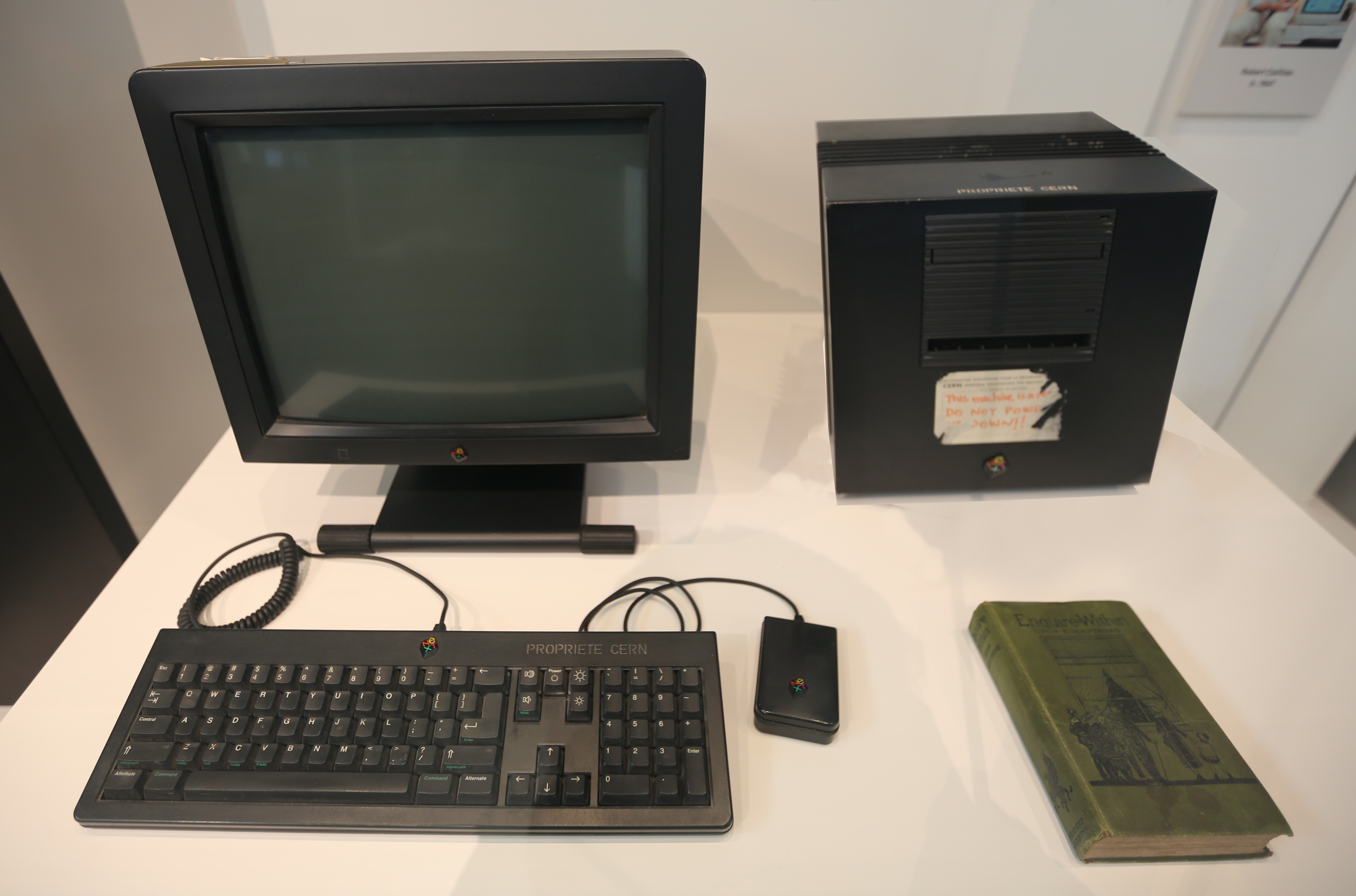
A few summers ago, my family traveled to Switzerland, ostensibly for hiking, but it was on the heels of the Higgs discovery, and we signed up for a tour at CERN. Among the items in their museum is the computer that ran the first web site. It was a NeXT cube, with a card taped to the side, humbly requesting that it not be turned off.
I'm still amused by the thought of a time when the entire world-wide-web could be brought down by accidentally turning off one computer!
If I was part of a university IT team and our site was linked to from the first webpage ever, I would at least make sure there was a redirect to a working page.
Actually, that this could happen (and did routinely) was seen as resilience by TimBL, a feature that allowed anyone to work on their own stuff without having to ask for permission. Having software that could have imperfection was what made the original idea revolutionary. The tone was more encyclopedic to encourage researcher at the time to contribute and update their link when they knew the target was changed, but they could very well not do that.
That first web page still exists because of the emotional value, but the pages this was linking to (or pages those were linking to, etc.) lost their interest at some point. That’s natural.
Maybe I am missing something, but how is this the first web site when it has css and javascript, which were brought about in 94-95, when the page claims it was published in 1992.
In clicking around, most of the page is the "original" but not sure about the line mode part. Thoughts?
This seems less like a website and more like a webbified gopher[0] protocol client-server experience. View source red flashing light: no <CAPITALS-ONLY-TAGS>. This is heavily massaged.
This page seems like a modern re-creation of what experiencing the original page on the original software and machines was like. The plain original page is at http://info.cern.ch/hypertext/WWW/TheProject.html.
On opening this thread in HN client "Materialistic" app. It crashes on its own. Is it happening with any other hn clients too? What's the reason for it?
I am just finishing The Innovators by Walter Isaacson (the guy who also did Jobs' biography) and it did a good job at tracing the threads of theoretical information management systems through to their practical manifestation via the invention of the web by Berners-Lee. It's a decent read and I'd recommend it if you have an interest in the history of computing as a whole and how the various ideas and concepts that came to shape how computers exist today were first born then later realised.


You can also go to the page without the line mode browser emulation: http://info.cern.ch/hypertext/WWW/TheProject.html
According to http://line-mode.cern.ch that page hasn't even been modified to work in a modern browser - it still displays perfectly as-is!